
Opening the dashboard
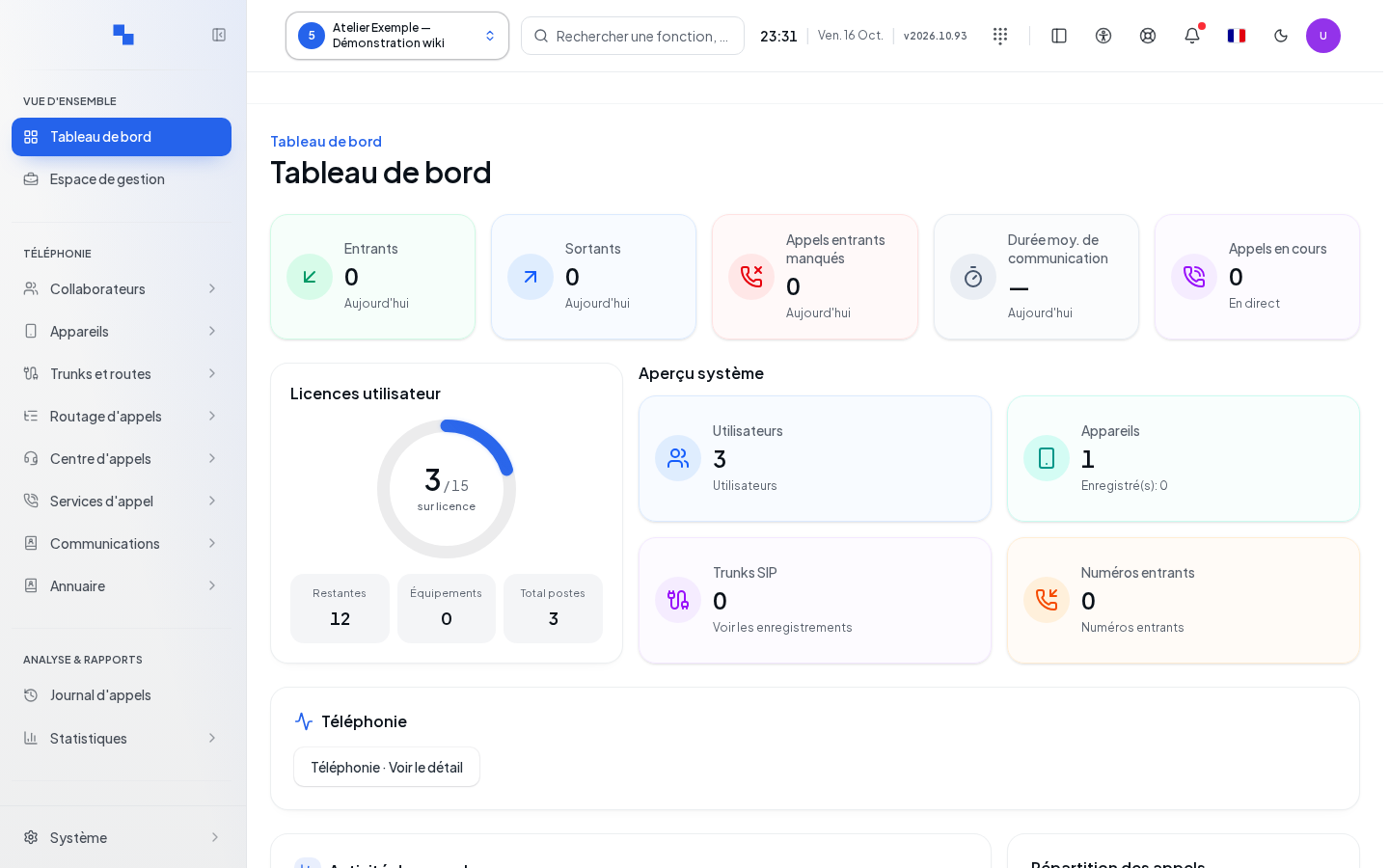
The dashboard provides a view of the client selected in Informatique Facile PBX. It is intended for accounts authorized to view administration; some cards require additional permissions on users, telephony, statistics, or monitoring.
- Log in with your administration account.
- Open Dashboard in the menu.
- Check the selected client in the top bar. If no client is selected, choose one before interpreting the data.
A system administrator does not necessarily get a client automatically selected. See the client selector.
Reading the cards and charts
Resource cards let you navigate to their respective screens: users, devices, carrier connections (SIP Trunks), and DID Numbers. SIP is the telephony connection protocol; a SIP trunk connects your system to a carrier. A configured resource is not necessarily connected.
| Item | Purpose | Reading and limitations |
|---|---|---|
| User licenses | Shows consumption of allocated rights | Check the source and availability of the measurement before adding accounts. |
| Call activity | Compares activity for the selected period | The compact selector offers Today, Last 7 days, This month, and Custom period; the period follows the client's time zone. |
| Total calls | Counts known calls for the period | An unavailable value does not mean zero calls. |
| Missed incoming calls | Identifies unanswered incoming calls | Compare with volume and period. |
| Answer rate | Compares answered calls to total calls | Without any measured calls, the percentage may be unavailable. |
| Call breakdown | Separates incoming, outgoing, and internal calls | Internal calls remain within the system; external calls go in or out. |
| Peak hours | Identifies the busiest times | Take into account the period and available data. |
| Call volume (7d) | Shows recent volume | This card maintains its own seven-day window. |
| Call stats | Shows, among other things, average duration and external calls | A displayed field does not guarantee a measurement exists. |
Custom period displays two date fields side by side, initialized with the current period. Enter the start date, then the end date; the end date cannot exceed today and must be at least equal to the start date. Indicators linked to this selector recalculate when the dates change.
The variation compares the previous period when its measurements are available. Percentage points of a rate and the percentage variation of a volume do not have the same meaning.
A dash or an unavailable measurement indicates that a value could not be established. Do not treat it as zero in a report. A partial history does not prove the absence of other calls.
Refreshing and viewing details
The Telephony block and its Refresh and View details controls are no longer available on this dashboard. To continue your analysis, use the statistics or monitoring sections available to your account in the menu.
Verifying the result
Check the client, the period, and any availability warnings. To verify the complete setup of a team, use Configure client: the dashboard alone does not replace a two-way test call.
If this doesn't work
If Retry is offered after a failed read, use it to retry that read. An access denial requires verification of your profile by an administrator. A loading error does not justify recreating users or trunks.
The message "No calls this week" is an empty chart state; also check the selected period and the other cards. If data is unavailable, report the displayed message and the affected client. See Statuses and access.