
Opening the Display Link
Open the complete link provided by the administrator, including the part after #. No account or user login is required. The link must be valid, not revoked, and accessed from an authorized network. Save it only on the intended screen and do not distribute it publicly.
New links have no expiration date and remain active until revoked. Network restrictions still apply; deleting the wall also removes access.
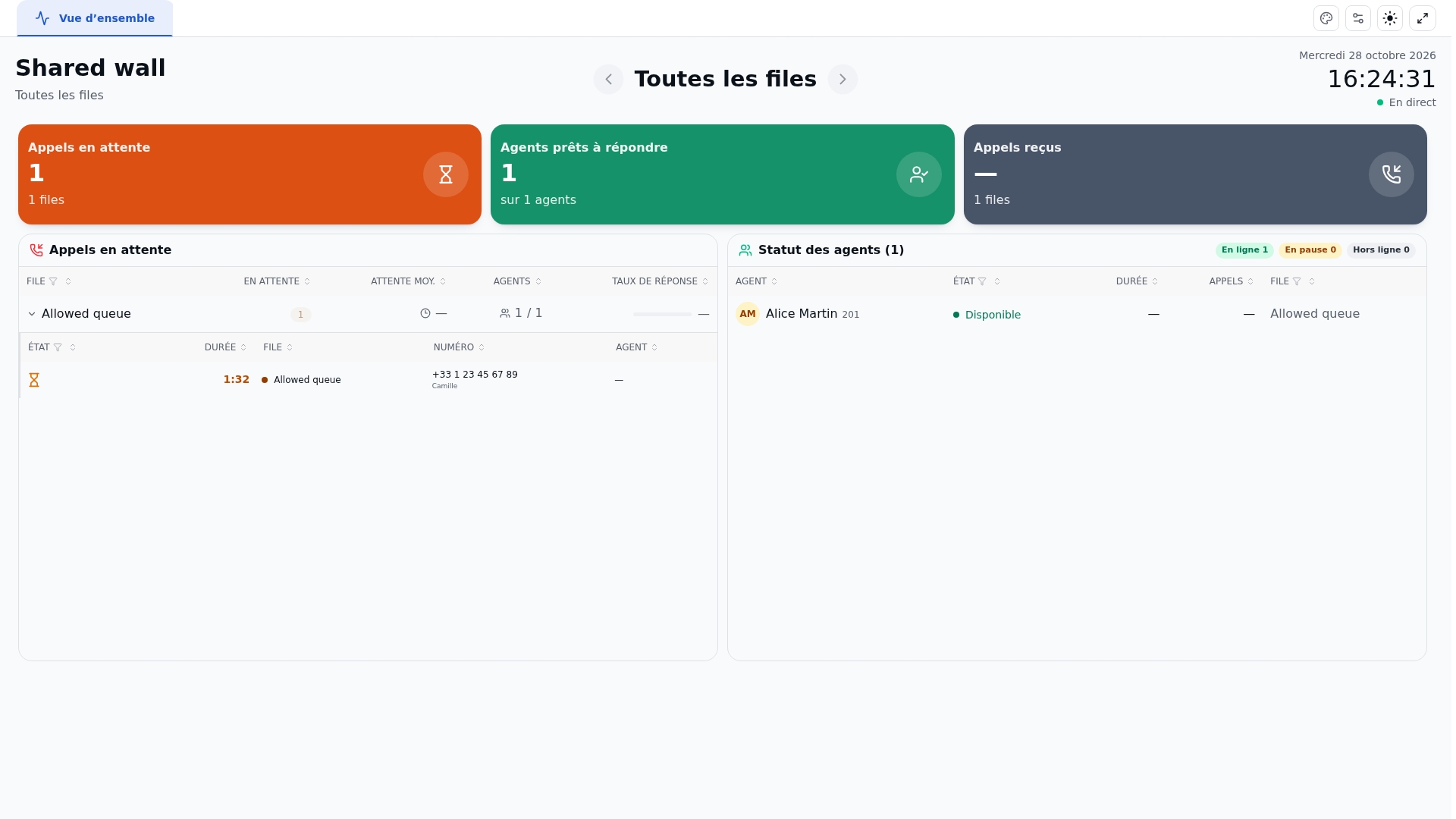
The dashboard loads and then refreshes automatically, approximately every two seconds after each read. Full screen makes it easier to display on a TV; a browser refusal does not prevent reading. Dates and times follow the organization's time zone.
Understanding What Is Visible
The link provides access to the chosen wall and the queues selected for it. If no queue is targeted, all queues in the organization are included. The saved configuration determines the available blocks: changes made to the wall are reflected on the shared screens.
| Data | Visibility |
|---|---|
| Queues, counters, and activity | Limited to the wall's scope; a missing metric remains unavailable |
| Waiting or ongoing calls | Caller names and numbers are transmitted when the calls block is present; they are removed otherwise |
| Recent calls | Numbers may appear when this block is saved |
| Agents and ranking | Names, statuses, and extensions may appear depending on the saved blocks; internal technical identifiers are replaced with opaque identifiers specific to the link |
| Pause reasons and phone channel identifiers | Not exposed by the public link |
| Wall modification and phone actions | Not available; access is read-only |
This sharing does not therefore automatically anonymize the entire dashboard. The administrator must check each block before distributing the link. Available metrics may differ from the logged-in display: a "—" value does not mean zero.
Checking the Result
Check the wall name, visible queues, time, and data freshness. Have the administrator confirm that any names and numbers displayed are appropriate for the location where the screen is placed.
If the Dashboard Becomes Unavailable
An incomplete link, a revoked link, or one rejected by network restrictions will prevent the wall from being read. Ask the administrator to check these points; the public message alone does not allow all these causes to be distinguished. An older link created with an expiration date may still expire: the administrator can replace it with a new link without expiration.
When contact is lost or access is refused, previous data is cleared. Check the connection, then let the refresh resume. Reads are limited by link and by network address; opening multiple tabs may interrupt the display. Use one link per screen. Display within a frame embedded in another site is not permitted.
To create or remove access, see Share a Wall Without Login.
Reading Compact Lists
Lists display more rows within the same height. Scroll the panel to reach additional rows; hover over a truncated name to read its tooltip. The public link remains a read-only display: adding and removing tabs, as well as configuring SLAs, is done from an authorized logged-in access to the wallboard.